Cook great
integrations.
Ship with flavor.
Dhurandhar is the kitchen where MuleSoft and Salesforce developers come together. Design APIs, transform data, scaffold Mule apps, build Lightning components, deploy to CloudHub — all from one platform.
From raw ingredients to a
perfect biryani
Imagine two developers — a MuleSoft architect and a Salesforce developer — trying to ship a connected platform together.
Building a great integration is like cooking a great biryani. Every layer matters. Every ingredient has a purpose. And the right kitchen makes all the difference.
Write the recipe
Design your API spec in RAML or OAS — this is your biryani blueprint.
The blueprint layerPrep the Mule base
Scaffold, edit, and run your Mule application — the rice layer that holds everything together.
The rice layerSeason with data
Transform and map data between systems — the spices that bind the whole dish.
The spice layerPrep the Salesforce layer
Build LWC components, deploy metadata, and load bulk data — the garnish on top.
The garnish layerApply the heat
Deploy to CloudHub 2.0 and publish to Exchange — turn on the stove and let it cook.
The heatWatch the pot
Monitor running apps and APIs in real time — keep an eye while the biryani cooks.
The watchServe from one kitchen
Install, launch, and manage every tool from a single place — the head chef's table.
The kitchenThat's a full meal.
That's Dhurandhar.
Every tool in your kitchen. Every layer of your integration. All managed from one beautiful desktop IDE — free to start, ready for your team.
The Kitchen
One kitchen. Eight stations.
Each tool is a station in the kitchen. The IDE is the head chef's table.
Discover · Install · Launch · Manage all tools
Anypoint Viewer
Read-only CloudHub & Exchange
AI DataWeave
GPT-4o DataWeave editor
AI API Designer
RAML 1.0 & OAS 3.0 workspaces
AI API Studio
Full Mule IDE + terminal + Git
API Controller
Publish · Deploy · Exchange
SF Studio
Salesforce CLI + Apex + Deploy
SF DevKit
Data Loader + LWC Builder
Anypoint Platform / CloudHub 2.0
Deploy · Exchange · API Manager · Design Center
Our product lineup
Tools for developers
Each tool is purpose-built for MuleSoft and Salesforce developers — free to start, with premium upgrades available.
Dhurandhar IDE
★ Start HereAvailable · v1.0.0Install this first — the central hub for all Dhurandhar tools
A Cursor-inspired Electron desktop app that serves as the command centre for the entire Dhurandhar ecosystem. Install it first, then use it to discover, install, launch, and manage every Dhurandhar tool from one beautiful, unified interface — no jumping between websites or folders.
Anypoint Viewer
Available · v1.2.0The MuleSoft developer desktop
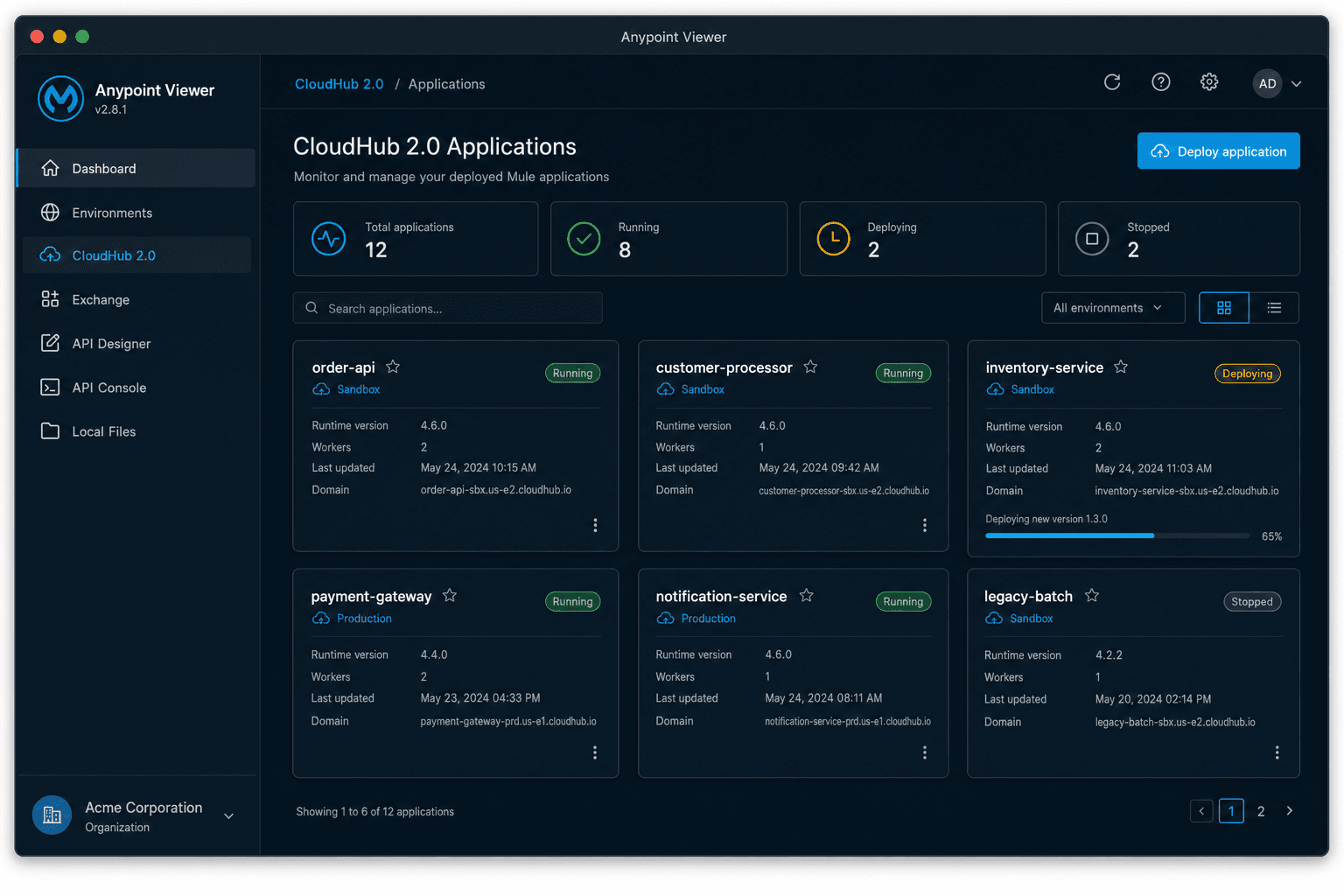
A native desktop app for macOS and Windows that connects to your Anypoint Platform account and puts CloudHub 2.0, API Designer, Exchange, API Console, Environments, and your local Mule projects in one beautiful interface.
AI DataWeave Playground
Available · v1.2.0Write, transform, and learn DataWeave with AI
A standalone desktop app for macOS and Windows powered by GPT-4o. Generate DataWeave 2.0 scripts from plain English, simulate transformations, fix errors, convert between formats (JSON, XML, CSV, YAML), and explore 20+ searchable built-in examples — all without leaving your desktop.
AI API Designer
Available · v1.1.0Design APIs in RAML 1.0 and OAS 3.0 with workspaces and Git
A standalone desktop app for macOS and Windows. Manage dedicated API design workspaces on your filesystem, design API specs in RAML 1.0 or OpenAPI 3.0, track changes with the built-in Git panel (commit, push, pull), live-preview endpoints as you type, and let GPT-4o generate complete specs, auto-document, convert formats, and review your spec. Export to Anypoint RAML ZIP, OAS YAML/JSON, Swagger, Postman Collection, or HTML docs.
AI API Studio
Available · v1.0.0Full MuleSoft IDE — workspaces, scaffolding, terminal, Git, and AI
A standalone desktop IDE for macOS and Windows, built for MuleSoft developers who want a lightweight alternative to Anypoint Studio. Create and manage Mule workspaces, scaffold new projects from templates (API-Led, Integration, Scheduler, Batch), edit XML/DW/YAML files with Monaco, run Maven commands in an embedded terminal, manage Git commits/push/pull — all supercharged by six GPT-4o AI modes.
API Controller
Available · v1.0.0Full Anypoint Platform command centre — publish, deploy, Exchange, and API Manager
A standalone desktop app for macOS and Windows that authenticates to Anypoint Platform via a Connected App (OAuth2 client_credentials). Publish RAML/OAS specs from your AI API Designer workspaces to Design Center and Exchange. Deploy Mule applications from your AI API Studio workspaces directly to CloudHub 2.0 with live status polling. Browse, inspect, and delete Exchange assets. Manage API instances, apply and remove policies (rate limiting, JWT, OAuth 2.0, CORS, and more), view contracts, and promote APIs between environments.
SF Studio
Available · v1.0.0Full-meal Salesforce CLI developer workstation
A standalone Electron desktop app for Salesforce developers. Manage SFDX workspaces and projects, scaffold new projects from templates, edit Apex and metadata files with Monaco Editor, run CLI commands with the embedded terminal, deploy and retrieve with live streaming output, execute anonymous Apex, run Apex tests, and manage Git commits — supercharged by an AI Apex assistant powered by GPT-4o.
SF DevKit
Available · v1.0.0Data Loader + LWC Builder — the ultimate Salesforce data & UI workstation
A standalone Electron desktop app combining Salesforce Bulk API v2 data management with a full Lightning Web Component builder. Load and export millions of records (Export/Insert/Upsert/Delete) with CSV field mapping, real-time job monitoring, and job history. Build, scaffold, edit, and deploy LWC and Aura components with Monaco Editor, browse your org's component library via Tooling API, and generate components with GPT-4o AI. All wrapped in workspaces, a Git panel, and an embedded terminal.
More tools coming
Coming soonWe are actively building the next set of tools for the MuleSoft and Salesforce developer community. Have a specific need? Let us know via the contact form.
Request a featureEverything in one place
Built for MuleSoft developers
Stop switching between browser tabs. Anypoint Viewer brings your entire Anypoint Platform workspace — plus an AI-powered DataWeave Playground — to a fast, native desktop app.
AI DataWeave Playground
Write, transform, and learn DataWeave 2.0 with GPT-4o at your side. Generate scripts from plain English, simulate transformations, fix errors, convert formats, and browse 23+ built-in examples.
CloudHub 2.0 Monitoring
See all your deployed Mule applications at a glance. Live status badges, replica counts, regions, and log streaming — no browser needed.
API Designer Viewer
Browse all your Design Center projects. View RAML and OAS specification files read-only with full syntax highlighting.
Anypoint Exchange
Search and browse your organization's Exchange assets — REST APIs, connectors, templates, policies, and more — with a rich detail panel.
API Console
Renders the MuleSoft api-console web component directly from your Design Center specs for beautiful, interactive read-only API documentation.
Local Mule File Browser
Open any Mule project folder built in Cursor or Anypoint Studio. Browse the file tree and preview every file with Monaco Editor syntax highlighting.
Environments Overview
See all sandbox, production, and custom environments in your Anypoint org with client IDs and environment type clearly labelled.
Get up and running in 2 minutes
How to install
Download the installer
Choose the right build for your platform: Apple Silicon (arm64) for M1/M2/M3/M4 Macs, Intel Mac for older Macs, or Windows (.exe) for Windows 10/11.
Open the installer
macOS: Open the DMG and drag Anypoint Viewer to your Applications folder. Windows: Run the .exe installer and follow the setup wizard — it creates a Start Menu shortcut automatically.
First-launch security prompt (macOS only)
On macOS, the first launch may be blocked since the app is not notarized yet. Right-click the app → Open to launch it anyway. This only needs to be done once. Windows users can skip this step.
Sign in with Anypoint Platform
Enter your MuleSoft Anypoint Platform username and password. Your token is stored securely on-device — nothing is sent anywhere else.
Start exploring
Your environments, CloudHub apps, Exchange assets, and API Designer projects load automatically. Open any local Mule project with the Local Files viewer.
What's new
Changelog
- AI DataWeave Playground — Transform, Generate, Explain, Fix, and Convert DataWeave scripts with GPT-4o
- Generate mode — describe a transformation in plain English and get a complete DW 2.0 script instantly
- Transform mode — paste any DW 2.0 script and input payload; AI simulates execution and returns the output
- Explain and Fix modes — understand scripts step by step or automatically repair broken ones
- Convert mode — choose source/target format (JSON, XML, CSV, YAML) and AI writes the converter script
- 23 searchable built-in examples across Basics, Format Conversion, Strings, Dates, Conditionals, and Mule-Specific categories
- Bring-your-own OpenAI API key — stored locally in electron-store, never sent to any third-party server
- Anypoint Viewer — native desktop app for macOS (Apple Silicon + Intel) and Windows
- CloudHub 2.0 application monitoring with status badges and log viewer
- Environments overview — list all org environments with type and IDs
- Anypoint Exchange browser with search and asset detail panel
- API Designer read-only viewer for Design Center RAML/OAS projects
- API Console — full MuleSoft api-console web component embedded
- Local Mule file browser with Monaco Editor syntax highlighting
- Secure Anypoint Platform login with persistent session (electron-store)
Free to use · Beta is live
Pull up a chair
Every great biryani is better shared. Dhurandhar tools are free for all MuleSoft and Salesforce developers. Need more? Reach out to unlock advanced features built for your team.
MuleSoft Community Forum
Join the MuleSoft community. Ask questions, share integrations, and connect with developers worldwide.
Contact for Upgraded Features
Need advanced capabilities, team licensing, or custom integrations? Get in touch and we'll discuss what's possible.
Want more power?
Advanced features, team dashboards, custom integrations, and enterprise support are available on request.
Download Dhurandhar IDE
Your kitchen starts here. Install the IDE first — it manages every other tool in the ecosystem from one place.
The Flavor Report
How did it taste?
You've tried the kitchen. Tell us what worked, what didn't, and what you'd like on the menu next.
Upgrade & support
Get in touch
Interested in advanced features, team licensing, custom integrations, or enterprise support? Fill in the form and we'll get back to you directly.